Format and goal
The capture shows Format Standard and Goal Best I Can Build Now.
 Scott's TCG Binder
Deck building brings eligible card information into a focused workspace for assembling and reviewing a deck while keeping collection ownership visible. Choose a format and a goal, then generate a deck from your collection or from the eligible catalog. The page can prefer cards you own. This is a deck builder inside the collection app. It does not certify official tournament legality, and it does not optimize or invent a deck on its own beyond the recommendation you generate from those choices.
Mac
shot desktop-decks · seq 13 · assets/screenshots/original/desktop/0013.png
iPhone
shot iphone-decks · seq 131 · assets/screenshots/original/iphone/decks.png
Additional platform screenshots will be added as this guide is expanded.
The capture shows Format Standard and Goal Best I Can Build Now.
My Collection or Entire Eligible Catalog.
Runs the recommendation. Competitive data can be refreshed from this page.
Build a Deck sits above Recommended and Saved Decks. More Options exposes Card Pool, Type Preference, and Build Deck Around This Card. Prefer cards I own is checked in the capture, with the note that the collection already limits the pool.
Mac
shot desktop-decks · seq 13 · assets/screenshots/original/desktop/0013.png
iPhone
shot iphone-decks · seq 131 · assets/screenshots/original/iphone/decks.png
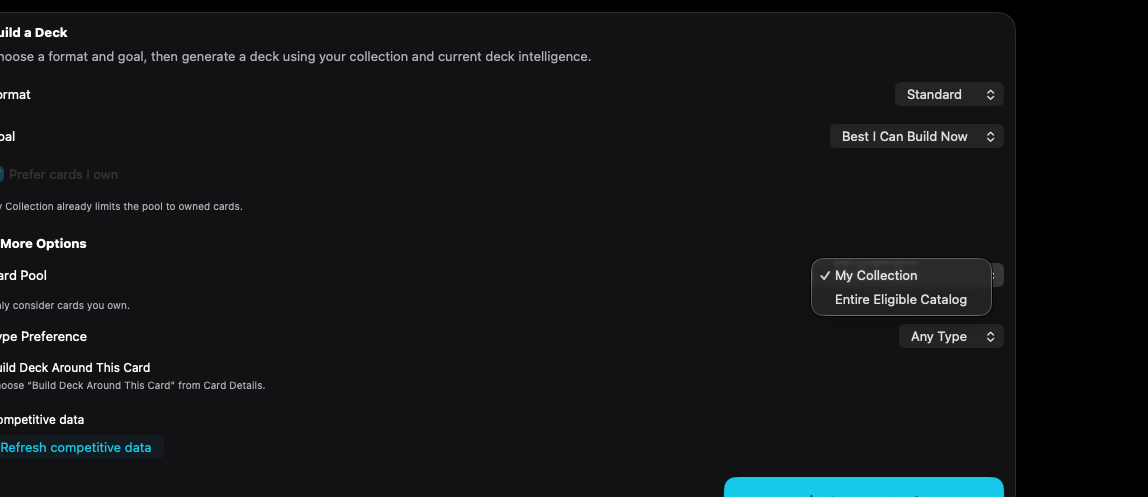
Format, goal, and card pool are chosen before Generate Deck.
Mac, iPhone, and iPad share the same collection model. Each platform presents those records in a layout that fits its screen.
Format and goal are menus.
Operational steps, controls, and the annotated screen.